Payment plans available for projects $2k+

How to Optimize Your Google Business Profile Like a Pro

If you own a service-based business and rely on local clients, your Google Business Profile (GBP) is one of the most powerful tools you have. It’s free, shows up in Google Maps and local searches, and helps build trust before a client even lands on your website.

But most people barely fill it out—and then wonder why the phone doesn’t ring.

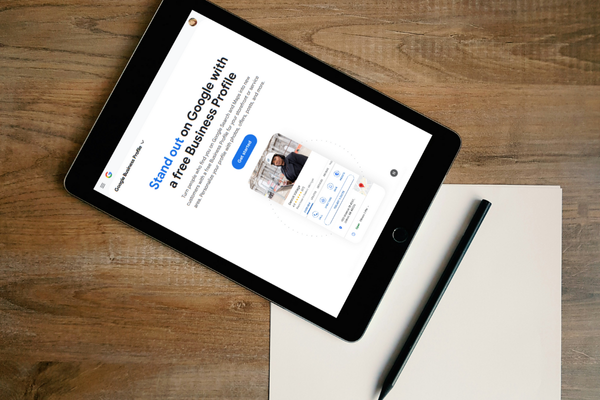
Tablet displaying Google Business Profile for the blog on How to Optimize your Google Business Profile–Like a Pro by Sprout Marketing and Design

Here’s how to optimize your GBP listing using strategies that work for home service providers, mobile businesses, consultants, coaches, and other local service pros.

Claim and Verify It—The Right Way

Start by claiming your business at business.google.com. You’ll go through a verification process (usually postcard, phone, or video). If you’re a service-area business (like a plumber, cleaner, mobile notary, etc.), choose to hide your address and instead set your service areas.

Make sure the name on your profile matches what’s on your paperwork, signage, and website exactly—no keyword stuffing or fake location names. Consistency matters.

Fill Out Every Section Completely

This isn’t optional. Google ranks more complete profiles higher in local search. Make sure you’ve filled in:

  • Business name
  • Categories (primary + additional—be specific)
  • Service areas if you don’t work from a storefront
  • Business hours, including special holiday hours
  • Phone number and website
  • Business description (we’ll cover that next)
  • Services list with clear titles and short explanations
  • Attributes like “woman-owned,” “on-site service,” or “LGBTQ+ friendly”
  • Opening date
  • Enable chat (if you are open to it)
  • Link your social profiles
  • Planning (appointment required section)


The more detail you give Google, the more confidence it has to show your business in results.

Write a Description That’s SEO-Aware but Human

Your “From the Business” description isn’t just fluff—it can help you show up in relevant searches. Here’s what it should include:

  • What you do
  • Who you help
  • Where you work
  • What makes you different


Keep it under 750 characters. Don’t overstuff it with keywords—but do mention your main service and city naturally. This helps reinforce relevance when people search locally.

Post Weekly (Yes, Weekly)

You can publish updates right to your Google listing, just like a social feed. These show up in your profile and signal to Google that your business is active.

Post ideas:

  • Reminders about services or seasonal offerings
  • Quick how-tos or tips
  • Special promos or booking openings
  • Announcements about service updates


Post at least once per week to keep your listing fresh and engaging.

Upload New Photos Monthly

Photos matter more than you think. Profiles with frequent, real photos get more clicks, more direction requests, and better engagement. Focus on:

  • Your logo
  • Photos of your work (before/afters, in-progress shots)
  • Photos of you or your team on the job
  • Behind-the-scenes of your workspace or tools


Add new ones every month. If you’re not uploading anything, Google may choose old or unrelated images from the web.

Get Reviews, Respond to Every One, and Use Keywords in Replies

Start asking for reviews early and often. The first few reviews are the hardest to get—but they matter the most.

Tips:

  • Ask immediately after completing a job
  • Send a direct link
  • Tell clients it only takes a minute and helps your business

Then respond to every review.

Google does read and index review replies
When you respond to a review, Google crawls the reply just like any other on-page content. Including relevant keywords—like your service and city—can reinforce topic and location relevance, which supports your local SEO overall. It’s subtle, but helpful.

It builds trust with future clients
Review replies aren’t just for Google—they’re for the people checking you out. A thoughtful, personal reply shows that you:

  • Care about client experience
  • Are actively managing your business
  • Are consistent and professional

⚠️ What not to do:
Don’t keyword stuff or make it weirdly robotic just for SEO. Keep replies natural. Example:

✅ Good:
“Thanks, Amy! So glad the deep clean helped you feel ready for your move-in. Enjoy your new place in Chandler!”

🚫 Bad:
“Thank you Chandler move-in cleaning service five-star review home cleaning best in Arizona!!”

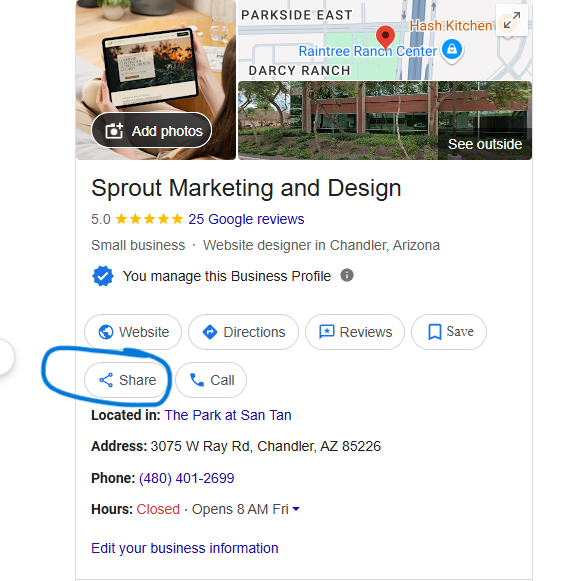
Mentioning your service and city in a natural way is a smart move, both for Google and the people reading. To get your GBP share link, look for this, and copy the link that pops up:

 

gbp

Use the Q&A Section to Your Advantage

Anyone can ask a question on your profile—and if you don’t answer it, someone else might (and not always accurately).

You can also seed your own questions. Post common client questions like:

  • “Do you offer emergency service?”
  • “How do I book a quote?”
  • “What areas do you serve?”


Then answer them as the business owner. This creates an FAQ right on your profile and shows clients you’re responsive.

Link Your Booking Platform and Services Clearly

If you use online booking, connect it directly in your profile. Google now supports integrations with many platforms used by service businesses.

Examples include:

If you don’t use a formal system, link directly to your website’s contact or quote form.

Check and Update It Monthly

Google constantly rolls out new features—don’t let your profile go stale.

Each month:

  • Double-check your hours
  • Add a new photo
  • Review analytics (how many calls, website clicks, messages, etc.)
  • Add a new post
  • Remove any outdated services or duplicate listings


This signals to Google that your business is active and trustworthy.

Avoid Common Mistakes That Kill Your Ranking

To keep your listing visible and working for you:

  • Don’t keyword stuff your business name
  • Don’t fake locations to rank in other cities
  • Don’t leave fields blank or outdated
  • Don’t buy fake reviews (they’ll get removed—and possibly penalized)


A clean, honest, optimized listing will always outperform a bloated or manipulated one over time.


Google Business Profiles aren’t just for restaurants or storefronts—they’re essential for every service business that wants to show up locally and get found by the right people.

Take it seriously. Keep it updated. And treat it like your mini-website on Google—because for many potential clients, it’s the first thing they see.

related posts
Web designer in Chandler

The 10 Places You Need to Be Online—Besides Google

You already know your business needs to show up on Google. You’ve probably claimed your Google Business Profile, maybe even asked for a few reviews. But here’s the truth: if Google is the only place your business lives online, you’re missing out on leads, visibility, and credibility.
Read More »